
How to Setup Email in Outlook?

How to Setup Email in Outlook?

How can I setup mail in Microsoft Outlook?

How to Configure Outlook | Outlook Email Setup

The below tutorial helps you to know how to set up email in outlook with step by step instructions. Follow the below instructions to configure your email in Microsoft Outlook.
Step 1: Open Microsoft Outlook. Under Tools Menu, choose Email Accounts option.
Choose Email Accounts In Outlook
Step 2: Email Accounts Window Opens. Choose "Add a new email account" and click Next.
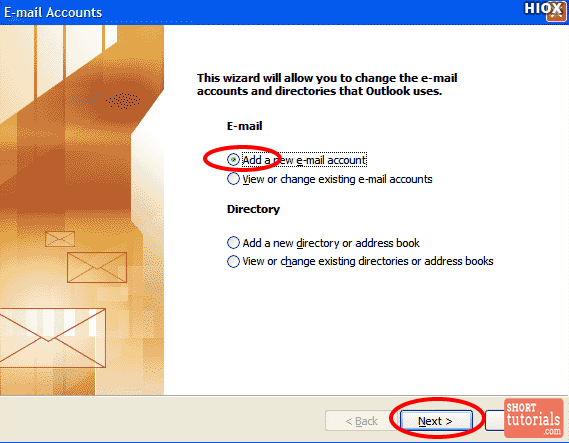
Choose Add Mail Accounts Outlook
Step 3: Select Pop3 as Server Type and click Next.
Select Pop3 Server Type In Outlook
Step 4: Internet Email Settings Window opens. Enter your information of Name, Email address, Username, Password, Incoming Mail Server and Outgoing Mail Server and click Next.
Email Settings In Outlook
Step 5: In the email settings window, choose the Outgoing Server tab.

Outlook Email Settings
Step 6:Select "My outgoing server (SMTP) requires authentication."
Step 7:Select "Use same settings as my incoming mail server".
Internet Mail Settings In Outlook
Step 7: Select Advanced Tab.
Step 8: Change the Outgoing Server Port to 25 and click OK.
Advanced Mail Settings In Outlook
Step 9: Click Next
Email Settings In Outlook
Step 10:Click Finish.
Email Account Setup In Outlook
Your email account setup in outlook has been completed.

Comments

Popular posts from this blog

SBI ATM Card Application Form - State Bank of India

માતાજીના છંદ - અમીચંદ

  માતાજીના છંદ - અમીચંદ    અંબા મા તારું દર્શન દુર્લભ, દર્શનથી દુઃખ ભાંગે છે, અરજ કરી માને શીશ નમાવું, ધનભાગ્ય મારું આજે છે...   લક્ષ ચોર્યાશી ફેરા ફરીને, મનસા અવતાર ધરાવ્યો છે, ગુલામ તમારો આવ્યો મુસાફર, માયામાં લપટાયો છે...   કામ, ક્રોધ, મોહ, મત્સર, માયા દુર્મતિ પર ધાયો છે, લોભ લહેર એક નદીયા વહે છે, ઉસમેં જીવ દુભાયો છે...   તુમ બીના પાર ઉતારે કોણ મા, ભક્તને કે શિર ગાજે છે, અરજ કરીને માને શીશ નમાવું, ધનભાગ્ય મારું આજે છે...   કોઈ વખત જીવ જાયે ધરમ પર, માયા પાછી લપટાવે છે, આકીન અમારું રહેતું નથી, મારું પાપ મને અથડાવે છે...   હવે ઉપાય શું કરું માતાજી, હમકું કોઈ બતાવે છે, ચાકર બેઠો ચિત્તમાં તમારો, દિલમાં બહુ ગભરાવે છે...   મારી હકીકત તું સહુ જાણે, ઘટઘટમાં તું બિરાજે છે, અરજ કરી માને શીશ નમાવું, ધનભાગ્ય મારું આજે છે...   માન નિરંજન તું દુઃખભંજન, નિરધનને ધન આપે છે, વાંઝિયા હોય તેનું મેણું ટાળી, તેને તું ફરજંદ આપે છે...   ભક્ત કરે મા ભક્તિ તમારી, તેને તું દર્શન આપે છે, જન્...

Full form / full Name

🕸🕸🕸🕸🕸🕸🕸 1. *PAN* - permanent account number. 2. *PDF* - portable document format. 3. *SIM* - Subscriber Identity Module. 4. *ATM* - Automated Teller machine. 5. *IFSC* - Indian Financial System Code. 6. *FSSAI(Fssai)* - Food Safety & Standards Authority of India. 7. *Wi-Fi* - Wireless fidelity. 8. *GOOGLE* - Global Organization Of Oriented Group Language Of Earth. 9. *YAHOO* - Yet Another Hierarchical Officious Oracle. 10. *WINDOW* - Wide Interactive Network Development for Office work Solution. 11. *COMPUTER* - Common Oriented Machine. Particularly United and used under Technical and Educational Research. 12. *VIRUS* - Vital Information Resources Under Siege. 13. *UMTS* - Universal Mobile Telecommunicati ons System. 14. *AMOLED* - Active-matrix organic light-emitting diode. 15. *OLED* - Organic light-emitting diode. 16. *IMEI* - International Mobile Equipment Identity. 17. *ESN* - ...